I am on a CrossFit high, with the Open just concluded and Regionals about to begin... So I am going to use some of my favorite Hero work outs (WOD) as a sample for this tutorial. There are scenarios where we want to display content based on the user's selection. Here is how to do it. … Continue reading PowerApps – Dynamically change visibility of controls
Category: Tutorial
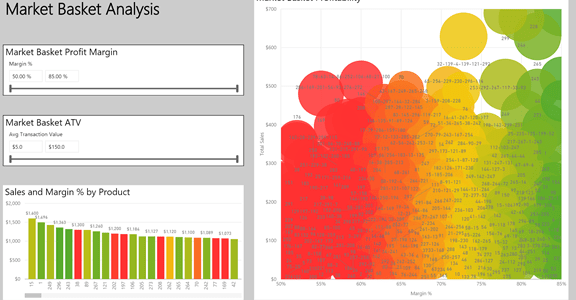
Market Basket Analysis using Power BI
EDIT: 2021-03-08 - An updated Power BI Desktop File and a video on this topic can be found here: https://businessintelligist.com/2021/03/08/market-basket-analysis-power-bi-dax-tutorial/ It's been almost two years since I posted about the CONCATENATEX() DAX function here. At the end of that post I promised to publish a tutorial on how one might do Market Basket analysis using … Continue reading Market Basket Analysis using Power BI
Connecting to SAP BW using Power BI Desktop
Today I connected to SAP BW using the connector available in Power BI Desktop. Following link does a good job explaining the steps: https://powerbi.microsoft.com/en-us/documentation/powerbi-desktop-sap-bw-connector/ Ran into a road block while installing SAP Netweaver RFC SDK library. With the help of bases team I downloaded SAP Netweaver SDK library. However there is no explanation as to where/how this … Continue reading Connecting to SAP BW using Power BI Desktop
PowerApps Common Data Service Connector
Here is how to get PowerApps Common Data Service Connector working. Note: You need to have Admin rights to Enable Power BI Integration Login to https://web.powerapps.com On the top right corner click on Settings (gear icon) Select Admin Center Select the environment you want to enable Select Database from the top menu Select Enable Now we … Continue reading PowerApps Common Data Service Connector
Power BI Tutorial: Dynamically update Date slicer to show Current Date
Here is a common requirement that I have come across: “I want the Date slicer to automatically select current date without me having to manually change the slicer”. Here is a way to do that. We have a Power BI Desktop report that was created on April 10th 2016. When the report was created, we … Continue reading Power BI Tutorial: Dynamically update Date slicer to show Current Date
Power BI Desktop: Interaction between Visuals
November release of Power BI Desktop delivered a highly requested feature – ability to configure interaction between visual elements in a report. Here is a quick tutorial of the configuration options. I have a report with 4 visual elements, a card, a clustered column chart, a bar chart and a donut chart. By default, when … Continue reading Power BI Desktop: Interaction between Visuals
POWER BI TUTORIAL : Using Variables in DAX
Earlier this year, new version of DAX was released. One of the key features with this release is the support for variables. Variables makes writing DAX code easier. Variables also make code easier to read and understand. Download sample data here. Data represents sales for a particular store. Products are categorized by seasonality and color. … Continue reading POWER BI TUTORIAL : Using Variables in DAX
POWER BI TUTORIAL: SURFACING POWER BI DASHBOARD IN POWERPOINT
Power BI Tiles add-in provides the capability to add interactive Power BI Tiles to PowerPoint. Let's see how to do it Open PowerPoint From the ribbon select Insert -> My Add-ins If you do not have Power BI Tiles add-in, click on Find more add-ins at the Office Store and search for Power BI Tiles … Continue reading POWER BI TUTORIAL: SURFACING POWER BI DASHBOARD IN POWERPOINT
Power BI Desktop : Merge Query Options
In Power BI Desktop, there are multiple options available when using Merge Query feature. This tutorial reviews each of the options. Data for the tutorial can be obtained by downloading Excel file from here . The file has Product sheet which has details of all the products my company sells The file also has a … Continue reading Power BI Desktop : Merge Query Options
Enabling Power View in Excel 2016
In Excel 2016, click on File -> Options -> Add-Ins From the drop down select COM Add-ins and select Go… In COM Add-Ins dialogue, if Power View for Excel is not selected, select the check box and click OK Notice that enabling the Add-In does not provide the ability to create a Power View report … Continue reading Enabling Power View in Excel 2016