
There are a couple of options to surface Excel Reports in Power BI Service. Download the sample file to OneDrive. The file contains a PivotTable report and a Power View report. Sign into PowerBI.com and from the left panel click on Get Data From the Get Data screen, click on Get button under Files section … Continue reading POWER BI TUTORIAL : HOW TO SURFACE EXCEL REPORTS IN POWER BI SERVICE
Category: Tutorial
Power BI Tutorial: Transform data from folder data source
Data for the tutorial can be obtained by downloading CSV files from: https://www.census.gov/popest/data/intercensal/state/ST-EST00INT-02.html For the tutorial I downloaded data for Alabama, Alaska and Arizona into a folder. Open the CSV files, and notice that all of them have the same layout. In this tutorial we are going to: Read data from the folder data source … Continue reading Power BI Tutorial: Transform data from folder data source
Power BI Desktop Tutorial: Building a Star Schema from an Excel Source
An updated version of this tutorial (including a video lecture) is available here: https://businessintelligist.com/?p=2718 This tutorial shows how to create a Star Schema using Power BI Desktop. Data for the tutorial can be obtained by downloading Excel file from here Very often our analysis starts with a flat data set that contains all of the … Continue reading Power BI Desktop Tutorial: Building a Star Schema from an Excel Source
The Definitive Guide on Collaboration in Power BI. Tutorial on Groups, Sharing, Coauthoring and Content Packs.
Well, not really that definitive actually… Before we jump into the details, I have to admit that I fully expect this post get outdated very soon. The collaboration features that have been released with GA of PowerBI 2.0 on July 24th 2015 are still not very refined and are very likely to become much more … Continue reading The Definitive Guide on Collaboration in Power BI. Tutorial on Groups, Sharing, Coauthoring and Content Packs.
Microsoft Added Formatting to Q&A so I wrote a quick Power Q&A Tutorial
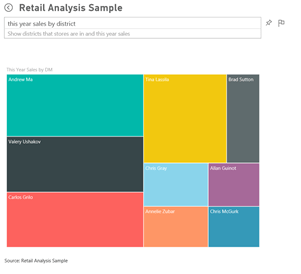
Microsoft Power BI team has released a lot of new features to http://app.powerbi.com including lots of formatting enhancements for Q&A (please follow this link for additional details http://blogs.msdn.com/b/powerbi/archive/2015/07/15/new-capabilities-added-to-power-bi.aspx ) In this post I wanted to show you how you might get started on Power Q&A using the Retail Analysis Sample that is currently available in … Continue reading Microsoft Added Formatting to Q&A so I wrote a quick Power Q&A Tutorial
Power BI Tutorial: UnPivot Feature
It's common that data is laid out across columns in Excel for reporting purposes. E.g. Revenue for each product is laid out across the columns in excel for each month. However this may not work well as a data source. Power Query provides Unpivot option to solve this issue. Sample workbook can be downloaded here. … Continue reading Power BI Tutorial: UnPivot Feature
Power BI Tutorial: How to Parameterize Connection Variables in Power Query
While migrating a power query solution across environments (Dev to UAT to Prod) changing connection variables for each power query is a tedious task. Here is a way to make the connection variable dynamic. The sample here has two power queries connecting to SQL server source. Create an excel table and call it Parameter with … Continue reading Power BI Tutorial: How to Parameterize Connection Variables in Power Query
Power BI Tutorial: Drill into Details
Power Query has a feature that can be used to drill into details. This is particularly useful when working with 32 bit excel. Sample workbook can be downloaded here. Here are the steps. For the purposes on the tutorial let's load Sales data from an excel table (this could be from a database). Highlight Sales … Continue reading Power BI Tutorial: Drill into Details
Power BI Tutorial: How to implement Currency Conversion Using Power Query and Power Pivot
Data for the tutorial can be obtained by downloading the following files: Exchange Rate File Working with Currency File Step 1: Load Sales Data to Data Model Open workingwithcurrency.xlsx, highlight Sales Data table, pick PowerPivot from the ribbon and select Add to Data Model Step 2: Using Power Query to transform Exchange Rate data … Continue reading Power BI Tutorial: How to implement Currency Conversion Using Power Query and Power Pivot
Power BI Tutorial: Many to Many Relationship using Power BI Designer
Quick disclaimer, the Power BI Designer is in preview right now and as such it is lacking a number of very important features that some consider minimally necessary for the product to be usable (a few thoughts on where the product is in its current state from my perspective could be found here). At the … Continue reading Power BI Tutorial: Many to Many Relationship using Power BI Designer
 business intelligist