
obviEnce published it's first Services App on Power BI. The app provides temperature and precipitation trends over the last 30 days across USA and Canada. The app will enhance your dataset by allowing you to analyze impact of weather on your business. Here is a snapshot of the dashboard.
Connecting to SAP BW using Power BI Desktop
Today I connected to SAP BW using the connector available in Power BI Desktop. Following link does a good job explaining the steps: https://powerbi.microsoft.com/en-us/documentation/powerbi-desktop-sap-bw-connector/ Ran into a road block while installing SAP Netweaver RFC SDK library. With the help of bases team I downloaded SAP Netweaver SDK library. However there is no explanation as to where/how this … Continue reading Connecting to SAP BW using Power BI Desktop
How to Integrate Flow with Microsoft Azure Data Lake
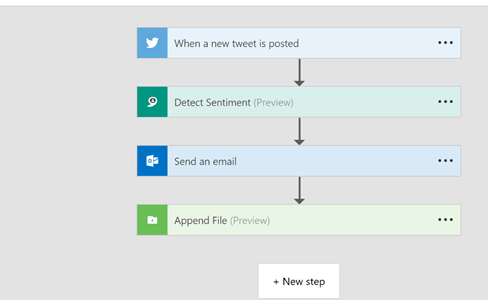
I really like Flow's ability to listen to Twitter. Some time ago, I set up a flow to listen to anything related to my Twitter handle, BizIntelligist. The initial design would just capture tweets that I deemed interesting and email them to me. Then, the cognitive services became available, so I added a step to … Continue reading How to Integrate Flow with Microsoft Azure Data Lake
The Long-awaited Matrix Control is Released for Power BI… and few other tidbits
Yesterday was a big day for Power BI – the long-awaited Matrix visual is now finally available. Sure, it's still in beta and yes, there are still some features lacking (formatting, formatting, formatting…), and yes, there are bugs (try to drill down on columns for example), BUT… this is a very significant update for Power … Continue reading The Long-awaited Matrix Control is Released for Power BI… and few other tidbits
Fact Checking the Gartner Magic Quadrant for Business Intelligence Report
Power BI was ranked very well by Garner in its annual Magic Quadrant for Business Intelligence and Analytics report. Most people never read the report because the only thing that really matters to them is the picture above. However, if you do bother to read it you will find a few statements about Power BI … Continue reading Fact Checking the Gartner Magic Quadrant for Business Intelligence Report
PowerApps Common Data Service Connector
Here is how to get PowerApps Common Data Service Connector working. Note: You need to have Admin rights to Enable Power BI Integration Login to https://web.powerapps.com On the top right corner click on Settings (gear icon) Select Admin Center Select the environment you want to enable Select Database from the top menu Select Enable Now we … Continue reading PowerApps Common Data Service Connector
How to Expose Key Values from SAP BW in Power Query
This information has been around the blogosphere for a while but I keep forgetting how to find it; I decided to write about it on my blog so that I can easily find it next time I need it. The existing functionality of the Power BI Connector for SAP BW only exposes text values of … Continue reading How to Expose Key Values from SAP BW in Power Query
Microsoft Flow and Cognitive Services
The Power BI team posted a great article about streaming tweets and sentiment data into Power BI. Unfortunately, the article does not get into the steps necessary to procure and set up Cognitive Services from Microsoft so I figured I would cover these details in this article. If you already have an Azure account, then … Continue reading Microsoft Flow and Cognitive Services
Working with Inline Tables and Using IN Operator in Filter
It's is often handy to be able to define a table in line with your calculation. Apparently, you can do it in DAX using the following syntax: { value1, value1, value3} The statement above creates a table that can be used with a DAX function that expects a table as a parameter. Example: {1, 2, … Continue reading Working with Inline Tables and Using IN Operator in Filter
Reading SAS (*.sas7bdat) Files In Power BI
Since Power BI does not have a native connector to SAS yet I decided to write this blog and walk you through using R to read data from your *.sas7bdat files. I will assume that the reader does not have R installed so I will walk you through all the steps necessary to get this … Continue reading Reading SAS (*.sas7bdat) Files In Power BI
 business intelligist