
Power BI Tutorial: How to Use Power Query to Load Data from a Formatted Report

Click here to download the data file for this tutorial. We are not always lucky to have our data neatly laid out in rows and columns. Sometimes, our data come in as a formatted report and we need to find a way to massage the data before it can be loaded into a data model. … Continue reading Power BI Tutorial: How to Use Power Query to Load Data from a Formatted Report
Power BI Tutorial: Generate ID field using Power Query

This tutorial is based on one of the earlier tutorials – How to Create a Star Schema Model. I strongly recommend that you go through it first to become comfortable with using Power Query to create facts and dimensions for your Star schema before we start working on ID generation. The data set that we'll … Continue reading Power BI Tutorial: Generate ID field using Power Query

Power BI Tutorial: How to Use Single Date Dimension in Your Model (using USERELATIONSHIP() Function)

Let's take a look at an unfortunately very familiar to most of us business scenario. A patient gets admitted to a hospital, spends several days there and then gets discharged (hopefully feeling much better 🙂 ). In this situation, we have two dates that describe this event, the date of being admitted and the date … Continue reading Power BI Tutorial: How to Use Single Date Dimension in Your Model (using USERELATIONSHIP() Function)

Power BI Tutorial: How to Create a Star Schema Model in Power BI and Power Pivot Using Power Query

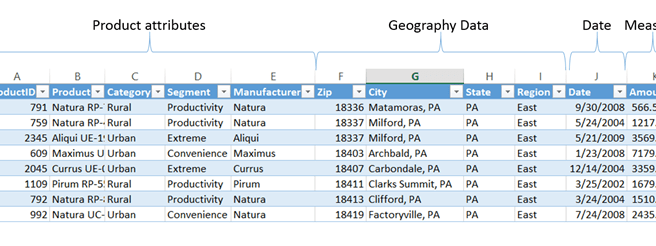
Click Here to download this Tutorial file Very often our analysis starts with a flat data set that contains all of the pertinent columns in a single table that looks like the one above. As we can see, we can analyze this data using three different lenses or dimensions: Product Geography Date Unfortunately, if we … Continue reading Power BI Tutorial: How to Create a Star Schema Model in Power BI and Power Pivot Using Power Query