Power BI Tutorial: How to Use Single Date Dimension in Your Model (using USERELATIONSHIP() Function)

Let's take a look at an unfortunately very familiar to most of us business scenario. A patient gets admitted to a hospital, spends several days there and then gets discharged (hopefully feeling much better 🙂 ). In this situation, we have two dates that describe this event, the date of being admitted and the date … Continue reading Power BI Tutorial: How to Use Single Date Dimension in Your Model (using USERELATIONSHIP() Function)

Power BI Tutorial: How to Create a Star Schema Model in Power BI and Power Pivot Using Power Query

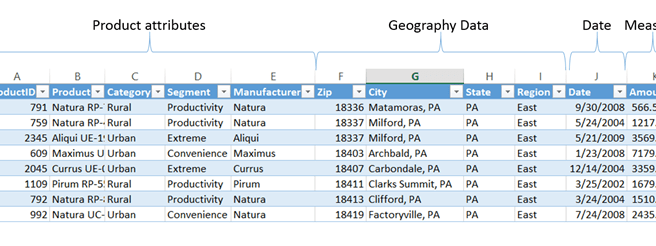
Click Here to download this Tutorial file Very often our analysis starts with a flat data set that contains all of the pertinent columns in a single table that looks like the one above. As we can see, we can analyze this data using three different lenses or dimensions: Product Geography Date Unfortunately, if we … Continue reading Power BI Tutorial: How to Create a Star Schema Model in Power BI and Power Pivot Using Power Query

Teradata, DB2, Folder and Many Others Now Supported via Power Query in Power BI Gateway

This is a biggie… a great number of new data sources is now supported for data refresh via a Power BI Gateway. Please follow this link for details. SAP Business Objects is not yet supported. I am particularly impressed with ability to refresh from folder (please note, only CSV files are supported, a folder full … Continue reading Teradata, DB2, Folder and Many Others Now Supported via Power Query in Power BI Gateway

Adding an Index Column to a Power Pivot Model using EARLIER() DAX Function

This post will be a little bit atypical compared to what I normally write about. I usually don't focus on topics like the one described below because there are plenty of other blogs that cover developer specific issues related to using DAX. However, I ran into an issue few days ago, could not find a … Continue reading Adding an Index Column to a Power Pivot Model using EARLIER() DAX Function

How to Use Pictures in Your Power BI Power View Dashboards

If you used pictures in your Power View dashboards and tried to deploy these dashboards in your Power BI tenant you are likely to have seen the following warning message: "UNSUPPORTED FEATURES External pictures can't be displayed in Power View Sheets in Office 365". My guess it's only a matter of time when external pictures … Continue reading How to Use Pictures in Your Power BI Power View Dashboards