
Author: Business Intelligist
Power BI Tutorial: Many to Many Relationship using Power BI Designer
Quick disclaimer, the Power BI Designer is in preview right now and as such it is lacking a number of very important features that some consider minimally necessary for the product to be usable (a few thoughts on where the product is in its current state from my perspective could be found here). At the … Continue reading Power BI Tutorial: Many to Many Relationship using Power BI Designer
What Is Power BI Designer And Why You Should Start Playing With It Right Now
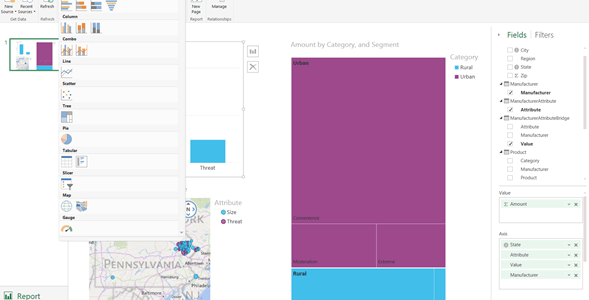
Although Microsoft has not yet given us an official roadmap for its Power BI offering, I believe it is not beyond the realm of reason to share some educated and uneducated guesses about where the Power BI Designer might fit in. Philosophically speaking, I have heard two opinions about Microsoft creating a standalone tool that … Continue reading What Is Power BI Designer And Why You Should Start Playing With It Right Now
Microsoft Updates MDS Plug-in for Excel
New updates are focused on performance. You can download the latest version here. Although the title states it's for SQL Server 2014, the plug-in also works with SQL Server 2012.
Check out this cool demo of Real Time Power BI Dashboard Tiles

Here is the link
How to Move Power View Sheets inside Excel
If you have used Power View inside Excel, you probably have noticed that Power View reports are housed inside a special type of a worksheet that does not contain traditional cells but rather looks like a canvas. The other difference is that once you have inserted a Power View worksheet in you Excel document, you … Continue reading How to Move Power View Sheets inside Excel
Power BI Tutorial: How to Use Power Query to Load Data from a Formatted Report

Click here to download the data file for this tutorial. We are not always lucky to have our data neatly laid out in rows and columns. Sometimes, our data come in as a formatted report and we need to find a way to massage the data before it can be loaded into a data model. … Continue reading Power BI Tutorial: How to Use Power Query to Load Data from a Formatted Report
Microsoft Releases Excel 2013 BI Stability improvements
Microsoft just released a major stability improvement for Excel 2013. Please read this post here for details. If you have Office 365 you can get this update by clicking on File->Account->Update Options->Update Now. However, many enterprise customers still chose not to deploy Click-To-Run version of office, in which case, there are links to four Knowledge … Continue reading Microsoft Releases Excel 2013 BI Stability improvements
Power BI Tutorial: Generate ID field using Power Query
This tutorial is based on one of the earlier tutorials – How to Create a Star Schema Model. I strongly recommend that you go through it first to become comfortable with using Power Query to create facts and dimensions for your Star schema before we start working on ID generation. The data set that we'll … Continue reading Power BI Tutorial: Generate ID field using Power Query
SQL Server 2012 SP1 Version of ADOMD.NET is Required for Analysis Services Power Query Connector
Understandably, I was very excited to find Analysis Services as a supported Power Query data source as of November update of the product (those familiar with the Business Objects connector will find the interface to be very familiar). I am running SQL Server 2014 on my machine and have the corresponding version of the ADOMD.NET … Continue reading SQL Server 2012 SP1 Version of ADOMD.NET is Required for Analysis Services Power Query Connector
 business intelligist