
It's is often handy to be able to define a table in line with your calculation. Apparently, you can do it in DAX using the following syntax: { value1, value1, value3} The statement above creates a table that can be used with a DAX function that expects a table as a parameter. Example: {1, 2, … Continue reading Working with Inline Tables and Using IN Operator in Filter
Author: Business Intelligist
Reading SAS (*.sas7bdat) Files In Power BI
Since Power BI does not have a native connector to SAS yet I decided to write this blog and walk you through using R to read data from your *.sas7bdat files. I will assume that the reader does not have R installed so I will walk you through all the steps necessary to get this … Continue reading Reading SAS (*.sas7bdat) Files In Power BI
Security Feature Has Been Released for Power BI
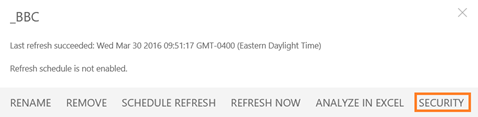
One of the most anticipated features that we all have been waiting for has now been finally released in Power BI by Microsoft. After a dataset has been published to Power BI, it can now be secured. This feature is still in preview and is a little bit rough around the edges as it … Continue reading Security Feature Has Been Released for Power BI
As a Vote of Non-Confidence to Its Own BI Strategy, SAP just acquired Roambi
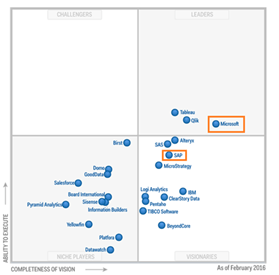
In a not particularly surprising move, SAP's knee-jerk reaction to its a dramatic fall in Gartner BI Rankings has resulted in a yet another acquisition. I was wondering about this scenario in my previous post about Tableau's stock taking a dive, where I pondered whether SAP had enough cash to acquire the company. It … Continue reading As a Vote of Non-Confidence to Its Own BI Strategy, SAP just acquired Roambi
Tableau Stock Implodes, Microsoft Recognized by Gartner for Its Vision in Analytics… and a Few Other Things That Happened This Week
This has been an interesting week for BI/Analytics industry. Lots of things happened; some of them were good and some bad… The most surprising news thus far, at least for me, was what happened with Tableau's stock. After its quarterly results were announced, the stock plummeted 50% (despite the fact that the company beat quarterly … Continue reading Tableau Stock Implodes, Microsoft Recognized by Gartner for Its Vision in Analytics… and a Few Other Things That Happened This Week
SAP BW Support for Power BI is PLANNED!
It is very unfortunate that at the time when there is such a flood of good and exciting news coming out from the Power BI dev team my workload made it almost impossible to post on this site. However, a recent update from the Power BI support site made me literally drop everything and write … Continue reading SAP BW Support for Power BI is PLANNED!
More Robust Tile Pinning to Dashboards Introduced in Last Power BI Service Update

Microsoft is making pinning a tile to a dashboard more user friendly with its last weekly Power BI service update. It was not always apparent what dashboard the tile would be pinned to; therefore, the dialog box above will make it much clearer to a user. More details for the weekly update are available here. … Continue reading More Robust Tile Pinning to Dashboards Introduced in Last Power BI Service Update
Drilldown is back in Power BI
Well…. Almost back… It has not yet made it back in Power BI Desktop but as of two days ago, charts in Power BI service support the ability to drilldown. In order to make charts drillable, all you need to do is to drag additional attributes into the Axis section of a chart as demonstrated … Continue reading Drilldown is back in Power BI
The Definitive Guide on Collaboration in Power BI. Tutorial on Groups, Sharing, Coauthoring and Content Packs.
Well, not really that definitive actually… Before we jump into the details, I have to admit that I fully expect this post get outdated very soon. The collaboration features that have been released with GA of PowerBI 2.0 on July 24th 2015 are still not very refined and are very likely to become much more … Continue reading The Definitive Guide on Collaboration in Power BI. Tutorial on Groups, Sharing, Coauthoring and Content Packs.
Power BI Desktop is Available to Download
Power BI Desktop is the new name for Power BI Designer. There are some feature incompatibilities to be aware of, check out this link for details https://support.powerbi.com/knowledgebase/articles/663517
 business intelligist