
Recently, I had a chance to work with Azure Analysis Services (AS) sourcing data from Azure Data Warehouse (DW) external tables. Optimizing the processing of the Azure Analysis Services partitions to use with the Azure DW external tables is a bit different from working with the regular (physical) data tables, and I will discuss the … Continue reading Optimizing Azure Analysis Services Partitions for Azure Data Warehouse External Tables
Quirks of Visual Studio Query Editor working with Analysis Services
Visual Studio 2017 and the SQL Server Data Tool (SSDT), a tool that comes with Visual Studio, finally integrates the now familiar Query Editor (Power Query) capability to work with the Analysis Services Tabular Model. Query Editor is a data ingestion and transformation tool used by Excel Power Pivot as well as Power BI. Now, … Continue reading Quirks of Visual Studio Query Editor working with Analysis Services
Giving access to Azure Active Directory Application to Enable Polybase
I have run into this a few times now and every time it took me a while to figure out what's going on, so I figured if I wrote about this on my blog, maybe I would not forget about it next time. Microsoft has a great article here that details how to setup Azure … Continue reading Giving access to Azure Active Directory Application to Enable Polybase
Scheduling Power BI Data Refresh using APIs
We have an enterprise job scheduler which is used to execute ETL jobs. The last step of the job scheduler is to refresh the Power BI data set. Here are the steps to do it. Create a Service account in your Azure Active Directory. Assign Pro license to the Service Account. Add the Service Account … Continue reading Scheduling Power BI Data Refresh using APIs
SAP BW Connector for Power BI – Support for additional member properties
October update of Power BI Desktop was released a couple of days ago. One of the key feature update in this release is that the SAP BW Connector now supports additional member properties (attributes). Earlier version of SAP Connector exposed only text value of the BW object. To get additional member properties, we had to have … Continue reading SAP BW Connector for Power BI – Support for additional member properties
Power BI Tutorial: Row Level Security on Parent Child Hierarchy
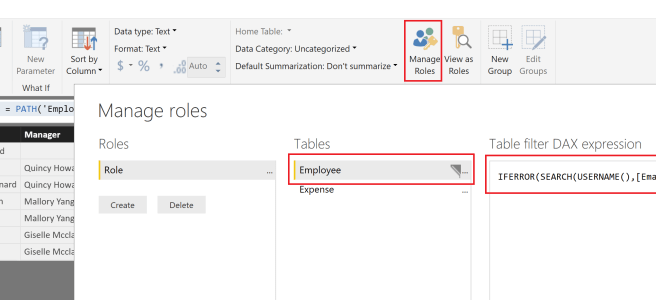
EDIT: I recorded a detailed video on how to work with Parent Child hierarchies in Power BI: https://businessintelligist.com/?p=2603 In the last post, I talked about flattening parent child hierarchy. Building upon that - the next question is how to make sure that an employee has access to only his/her data and that of the employee(s) … Continue reading Power BI Tutorial: Row Level Security on Parent Child Hierarchy
Power BI Tutorial: Flatten Parent Child Hierarchy
EDIT: I recorded a detailed video on how to work with Parent Child hierarchies in Power BI: https://businessintelligist.com/?p=2603 I have been working with SAP data source lately. And in SAP dimensions, parent-child hierarchy is very common and there is a need to flatten it in Power BI. A common parent child hierarchy is an employee … Continue reading Power BI Tutorial: Flatten Parent Child Hierarchy
Content Packs vs Power BI App
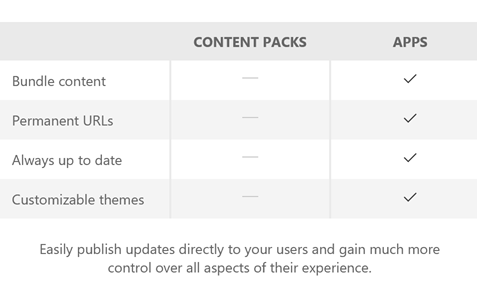
Sometimes, in order to innovate, we have to take a step back before we take two steps forward. What that statement means in the context of this article is a mystery and for many of us such is the difference between Content Packs and Power BI Apps. Microsoft revealed Power BI Apps in this blog … Continue reading Content Packs vs Power BI App
Power Shell script to load data in to Data Lake Store
In an earlier post, we talked about self-service process to hydrate the Data Lake Store. We also mentioned the need to use Power Shell to load data files larger than 2Gb. Here is the Power Shell script: Provide your credentials to login to Azure: $MyAzureName = "<YourAzureUsername>"; $MyAzurePassword = ConvertTo-SecureString '<YourAzurePassword>' -AsPlainText -Force; $AzureRMCredential = New-Object System.Management.Automation.PSCredential($MyAzureName, … Continue reading Power Shell script to load data in to Data Lake Store
SAP BW Connector for Power BI – Entering Parameter values
With recent updates to Power BI Desktop there have been a lot of enhancements to BW connector. The most significant of them is the ability to filter parameters to display only those that are required. This is achieved by clicking on Show on the top right corner of the Navigator dialog and selecting Only required parameters. … Continue reading SAP BW Connector for Power BI – Entering Parameter values
 business intelligist