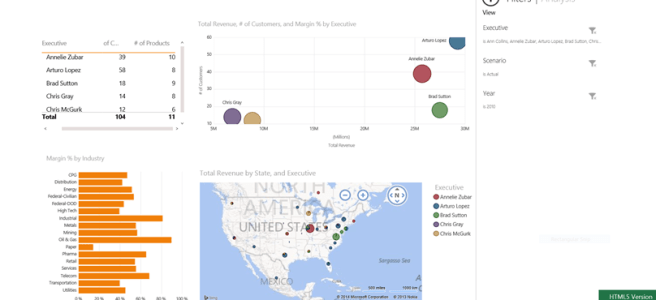
Just a few months ago I wrote a post about what Power View features were supported by Silverlight and HTML5 versions of the product. Today I had to make some corrections, as Maps are now supported in HTML5. The Power BI application for Windows 8 still does not render the map (or the scatter … Continue reading Power View HTML5 Now Supports Maps
Category: Excel and Excel Services
What is the Microsoft Power BI connector for SAP?
I have been getting some questions about it recently so I decided to write a few lines in addition to what's now available on the Power BI site. Here is a list of some key points about the tool: No middle-ware components are necessary to provide the connectivity between Excel and the Business Objects server. … Continue reading What is the Microsoft Power BI connector for SAP?
How to delete a Power Query from the Data Catalog
Data Catalog is one of the most interesting features of Power BI, however, there are several strange idiosyncrasies that I would like to surface in this post. The first one is the fact there is no way to access the data catalog from the Power BI admin site (if there is one, it must be … Continue reading How to delete a Power Query from the Data Catalog
Power BI Data Management Gateway and OData
I just got back from the SharePoint conference and wanted to write down a few points about the Power BI Data Management Gateway before I forgot. It appears that there may be a progression in how Power Query may get used by an organization. I cannot say I am 100% clear on all the scenarios … Continue reading Power BI Data Management Gateway and OData
HTML5 and Anonymous access in Power BI… or check out the new Demo Gallery
I don't expect that anyone will be blown away, at least initially, with the new demo gallery now available on the Microsoft Power BI site because to a business user, the content of those demos will look a little difficult to relate to if not a little nonsensical. Zany layouts aside, there is, however, a … Continue reading HTML5 and Anonymous access in Power BI… or check out the new Demo Gallery
What is Power BI Gateway?
After I wrote the step by step guide on integrating on premise data with Power BI models I realized that I actually dispensed some bad advice. The basic premise of the post was to demonstrate how one may use Power Query to source data into a Power Pivot model in a very elegant way (at … Continue reading What is Power BI Gateway?
HTML5 support In Power View and Power BI
Now that Power BI is Generally Available (GA) I thought it would be useful to do a quick analysis of how Power View visualizations are supported in Power BI across the three media – Silverlight (default), HTML5 and Windows 8 App Please find a table below for a quick reference Feature Silverlight HTML5 Windows 8 … Continue reading HTML5 support In Power View and Power BI
How to configure on premise access in Power BI and use Power Query to load on premise data into Power Pivot
In this post I will walk you through all the steps necessary to expose your on premise enterprise data to your Power BI users of Power Query in Excel and also will demonstrate how to source that data into a Power Pivot workbook. I am not going to give you too much theory, rather, I … Continue reading How to configure on premise access in Power BI and use Power Query to load on premise data into Power Pivot
How to load Power Query directly into Power Pivot
I have to admit, I like Power Query more and more every day. Even though on one hand sometimes I feel that the tool will only appeal to a very specific type of power users, on the other hand, I can't help but feel that the tool is so good that I wonder if it … Continue reading How to load Power Query directly into Power Pivot
A quick rant on Power BI, #confused….
There are now scores of blogs and web articles available that do a great job of introducing Power BI (a good example can be found here) so there is little value in re-hashing it in this post. I do, however, want to reflect and pontificate a bit on this announcement. The most important piece of … Continue reading A quick rant on Power BI, #confused….