
The experience while authoring reports using direct query for SAP data source is sometimes not optimal. Every click sends a query to the data source and we have to wait for the visuals to refresh.... Here is how I work around this issue. It's not ideal but makes authoring experience a little better. From the … Continue reading Improving authoring experience for SAP Direct Query reports
Author: nikilprabhakar
Power BI SAP BW Connector – Enable Tracing
Here is a common problem statement: I am using SAP BW Connector available in Power BI with import mode. When I either connect or refresh data, I get a MDX error and I need to make sense of it. How did I get the underlying MDX statement and debug through the issue... Here's how. Create … Continue reading Power BI SAP BW Connector – Enable Tracing
How to overcome SAP BW memory overflow issue
I have been using Power BI BW connector to connect to composite provider and BEx query for a while now. I have run into issues where there is a memory overflow in SAP BW or time out error quiet often. This is typically due to the volume of data that needs to be retrieved. Here … Continue reading How to overcome SAP BW memory overflow issue
Scheduling Power BI Data Refresh using APIs
We have an enterprise job scheduler which is used to execute ETL jobs. The last step of the job scheduler is to refresh the Power BI data set. Here are the steps to do it. Create a Service account in your Azure Active Directory. Assign Pro license to the Service Account. Add the Service Account … Continue reading Scheduling Power BI Data Refresh using APIs
SAP BW Connector for Power BI – Support for additional member properties
October update of Power BI Desktop was released a couple of days ago. One of the key feature update in this release is that the SAP BW Connector now supports additional member properties (attributes). Earlier version of SAP Connector exposed only text value of the BW object. To get additional member properties, we had to have … Continue reading SAP BW Connector for Power BI – Support for additional member properties
Power BI Tutorial: Row Level Security on Parent Child Hierarchy
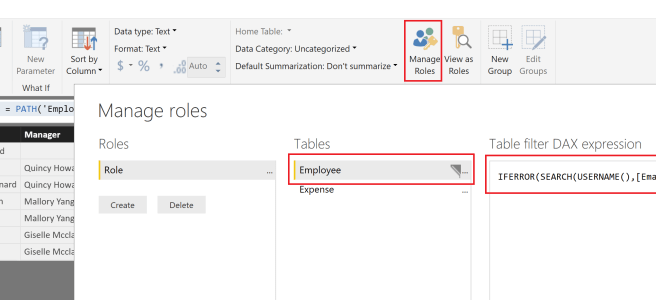
EDIT: I recorded a detailed video on how to work with Parent Child hierarchies in Power BI: https://businessintelligist.com/?p=2603 In the last post, I talked about flattening parent child hierarchy. Building upon that - the next question is how to make sure that an employee has access to only his/her data and that of the employee(s) … Continue reading Power BI Tutorial: Row Level Security on Parent Child Hierarchy
Power BI Tutorial: Flatten Parent Child Hierarchy
EDIT: I recorded a detailed video on how to work with Parent Child hierarchies in Power BI: https://businessintelligist.com/?p=2603 I have been working with SAP data source lately. And in SAP dimensions, parent-child hierarchy is very common and there is a need to flatten it in Power BI. A common parent child hierarchy is an employee … Continue reading Power BI Tutorial: Flatten Parent Child Hierarchy
Power Shell script to load data in to Data Lake Store
In an earlier post, we talked about self-service process to hydrate the Data Lake Store. We also mentioned the need to use Power Shell to load data files larger than 2Gb. Here is the Power Shell script: Provide your credentials to login to Azure: $MyAzureName = "<YourAzureUsername>"; $MyAzurePassword = ConvertTo-SecureString '<YourAzurePassword>' -AsPlainText -Force; $AzureRMCredential = New-Object System.Management.Automation.PSCredential($MyAzureName, … Continue reading Power Shell script to load data in to Data Lake Store
SAP BW Connector for Power BI – Entering Parameter values
With recent updates to Power BI Desktop there have been a lot of enhancements to BW connector. The most significant of them is the ability to filter parameters to display only those that are required. This is achieved by clicking on Show on the top right corner of the Navigator dialog and selecting Only required parameters. … Continue reading SAP BW Connector for Power BI – Entering Parameter values
PowerApps – Sharing apps
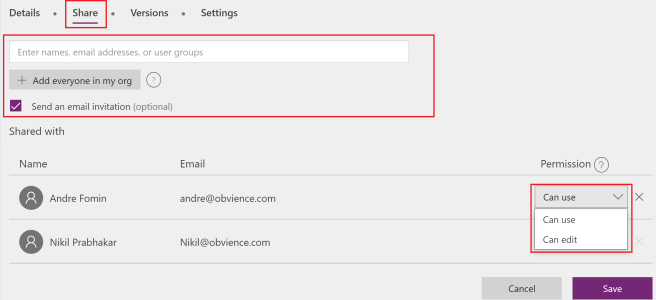
Once you create a PowerApp, you need the capability to share the app with users. How do we do that ? Let's take a look. To share a PowerApp, the app has to be saved in the cloud. Local apps cannot be shared. If you are using PowerApps studio, click on File -> Share. This will … Continue reading PowerApps – Sharing apps
 business intelligist