
Unfortunately, Power BI does not natively support Parent/Child hierarchies. Luckily, we have several DAX functions that make it possible to convert (or flatten) a parent/child hierarchy into a traditional Power BI Level based hierarchy. In this video I introduce parent child hierarchies, talk about some of the requirements necessary for Power BI to be able … Continue reading POWER BI & DAX: How to Flatten Parent Child Hierarchy
Category: DAX
Power BI & DAX: Working with Workdays
Working with Workdays does not have to be hard work. At least that's the claim I make in the video below: Please watch the video to understand the theory behind the calculations. I am pasting the calcs below just in case you find them useful. DATE Table calcs: IsHoliday =VAR Holiday = RELATED ( Holidays[Holiday] )RETURN IF ( Holiday = BLANK (), FALSE (), TRUE () ) WeekDayNo =WEEKDAY ( 'Date'[Date], 2 ) IsWorkDay =IF ( 'Date'[IsHoliday] || 'Date'[WeekDayNo] > 5, FALSE (), TRUE () ) WorkDayID =IF ( 'Date'[IsWorkDay], CALCULATE ( COUNT ( 'Date'[Date] ), FILTER ( ALL ( 'Date' ), 'Date'[IsWorkDay] = TRUE () && 'Date'[Date] <= EARLIER ( 'Date'[Date] ) ) )) Measures: NoOfWorkDays =CALCULATE ( COUNT ( 'Date'[Date] ), 'Date'[IsWorkDay] ) Revenue by Work Day =DIVIDE ( [Revenue], [NoOfWorkDays] ) … Continue reading Power BI & DAX: Working with Workdays
Power BI: How to Implement Dropdown Navigation
EDIT 2021-03-02: if you would like to learn how to create a Dynamic Dropdown Navigation - please follow this link: https://businessintelligist.com/2021/03/02/dynamic-dropdown-navigation-in-powerbi/ Dropdown navigation allows us to use the real estate of the report page more efficiently. Traditionally, we use buttons and bookmarks to implement navigation between different pages in our reports, however, as number of … Continue reading Power BI: How to Implement Dropdown Navigation
Power BI & DAX: How to Implement Dynamic Page and Chart Titles
We often need to have a dynamic title (page or chart level) that changes based on what the user has selected from the different slicers/filters on the page. In this video, I go over several strategies for accomplishing this task. I start with a very simple one, that requires no knowledge of DAX and then … Continue reading Power BI & DAX: How to Implement Dynamic Page and Chart Titles
PowerBI & DAX – Introduction to Calculation Groups
Calculation Groups is a powerful modeling capability in Power BI that allows us to dramatically reduce the number of measures in a model. Calculation Groups also have a dynamic formatting feature that allows us to specify a different format for our measures ($$ vs. %) on the same chart.
Working with Workdays in Power BI – Translating Workdays into Dates
EDIT: an updated version of this article with a video can be found here: https://businessintelligist.com/?p=2580 Power BI has a robust set of functions to write date-based calculations. One of the areas that has proven to be a challenge is related to doing math on working days instead of normal dates. \ Here is a simple … Continue reading Working with Workdays in Power BI – Translating Workdays into Dates
Price Volume Mix Analysis Using Power BI
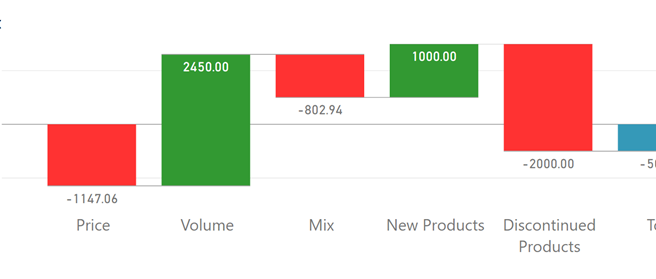
EDIT 2020-12-14: the final installment of the three part series on PVM with DAX formulas and the latest video can be found here: https://businessintelligist.com/2020/12/11/dax-for-perfect-price-volume-mix-pvm-calculation-power-bi-tutorial/ EDIT 2020-11-20: the most recent post about this topic, including a video, can be found here:https://businessintelligist.com/2020/11/20/the-definitive-guide-to-price-volume-mix-calculation-pvm-in-power-bi-theory/ EDIT: 202-04-24: I have made some additions to the original post, please see the theory … Continue reading Price Volume Mix Analysis Using Power BI
 business intelligist